Dog Trainer Session Reports: A Complete Guide for Solo Trainers
For solo dog trainers, the session report is one of the most underused tools in the business. Done well, it's what turns an hour of training into something the client can read, save, and refer back to all week. Done poorly, or skipped, it's where clients quietly lose faith and stop booking.
This guide covers what session reports actually are, what makes a good one, why they matter more than most trainers realize, and how to make them part of your workflow without spending hours of evening admin time.

The basics
What is a dog trainer session report?
A dog trainer session report is a written summary of a training session, sent to the dog's owner. It covers what was worked on, how the dog is doing, and what the owner should practice before the next session.
Session reports range from quick text messages (“good session today, keep working on recall”) to polished branded PDFs with behavior ratings, photos, and structured homework. The format you choose matters less than the underlying purpose: making the work of the session visible to someone who didn't see most of it happen.
“A trainer can do excellent work in a session. But unless the owner can see what was done, the session disappears into memory by Tuesday. The report is what keeps the work alive.”
Retention
Why session reports matter for solo dog trainers
Most dog trainers don't lose clients because the training is bad. They lose them in the silence between sessions. You see a client for one hour a week. They spend the other hundred-plus hours with their dog, on their own. Three things happen in that silence, and all of them work against you.
Motivation fades
The client who planned to practice every day starts skipping. By week three, the homework has quietly become optional.
Progress becomes invisible
You can see the dog improving in small, technical ways. The owner can't. They're measuring against the finish line, and until the dog reaches it, they file everything under "still not fixed."
Doubt sets in
Is this actually working? They don't ask you because they don't want to seem impatient. They just stop scheduling.
A good session report closes the gap. It reinforces motivation by giving the client something concrete to engage with. It makes invisible progress visible by naming the specific wins they would otherwise miss. And it answers the doubt before it has time to settle.
We covered this in more detail in The Silence Between Dog Training Sessions Is Where You Lose Clients. The short version: session reports are not really about reports. They're about retention.
Complete checklist
What to include in a dog trainer session report
The best session reports are clear, specific, and focused on what's useful to the owner. A one-page report with specific, actionable detail is more useful than a two-page report with vague observations.
Session details
Dog's name, owner, date, session type, and the environment. This lets the report stand on its own as a record the client can refer back to in six months.
Focus areas
What you actually worked on. Loose-leash walking, recall, impulse control, socialization, crate training. Owners forget what they covered with you; the report reminds them.
Photos
Visual proof from the session adds emotional weight. Even one or two photos of the dog during training reminds the owner what an hour with their dog actually looked like.
Session summary
Two or three short paragraphs covering the high-level story of the session. What went well, what was challenging, where the dog is right now.
Behavior ratings
Specific evaluations on a scale. A rating of 3/5 on recall with a sentence explaining what that means in this dog's specific context turns 'she's getting better' into something trackable.
Progress highlights
Specific wins in plain language. Not 'the dog showed good engagement' but 'Luna held a sit-stay for 30 seconds even with another dog walking past at 20 feet.'
Areas for improvement
Honest but constructive notes on what needs more work. Owners trust trainers who are direct about challenges. Naming the work that's left also validates the cost of future sessions.
Next steps
What's coming in the next session, written as if you're speaking to the owner. 'Next session, we'll work on recall in a slightly busier environment.' This builds anticipation.
Homework
Specific exercises in plain language. Not 'implement incremental distraction proofing' but 'practice recall in your backyard five times a day, using chicken or cheese.'
Progress since last session
A comparison to previous sessions, so the owner sees the trajectory and not just the snapshot. This is where slow, incremental improvement becomes visible.
These sections don't all need to appear in every report. The point is to give the owner a clear, specific picture of where their dog is and where they're going.
Example
What a good session report looks like
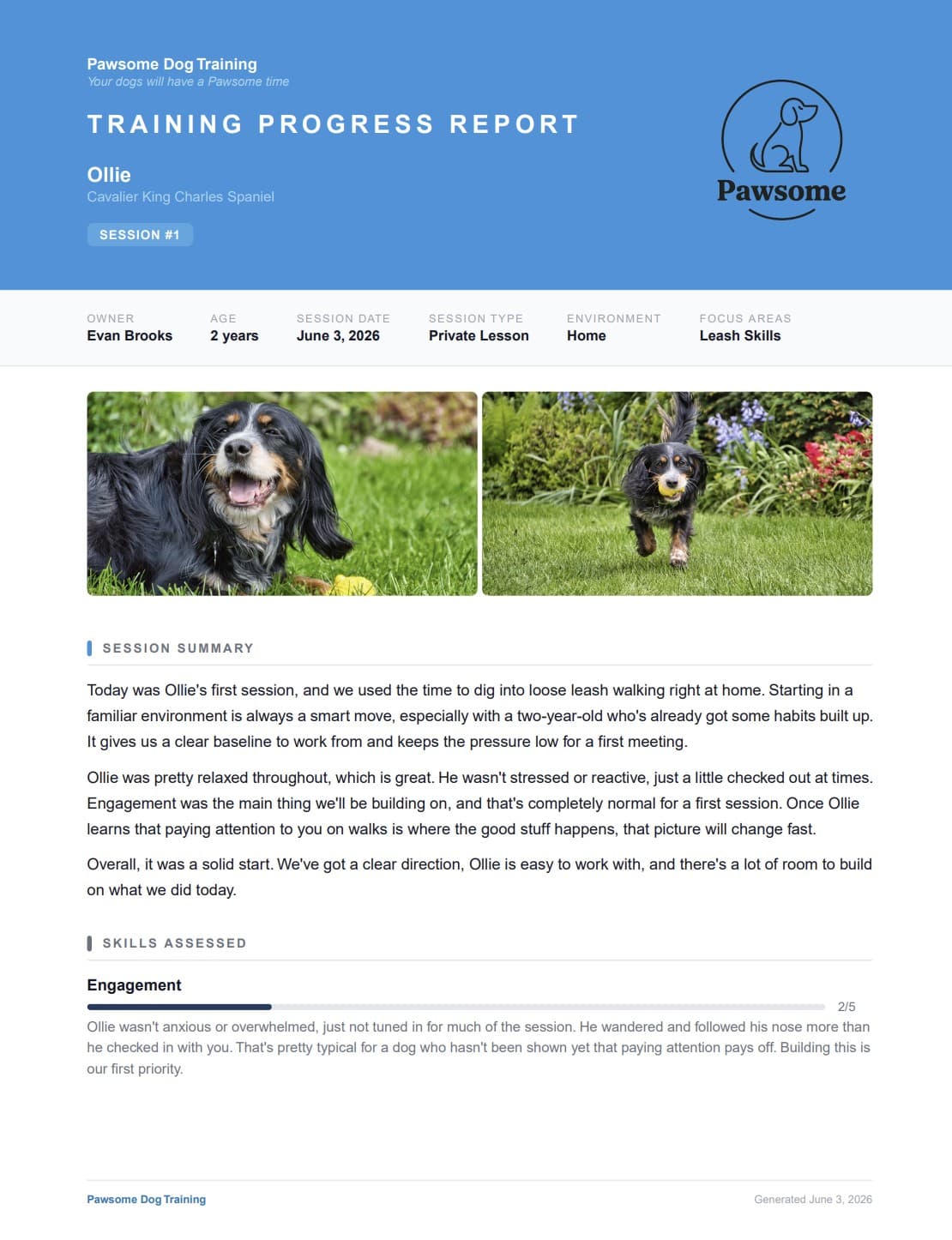
A polished session report turns rough trainer shorthand into something a client wants to read and save. The same session can be documented as a paragraph of texted notes or as a branded, structured report. The underlying information is the same. What changes is how the client experiences it.
30 min
to write one report by hand
7 hrs
lost per week at 15 sessions
This is where the retention work that would compound your business gets cut from the schedule. Most trainers don't have a free 30 minutes after every session, so they default to a quick text and skip the polished version. The work that would keep clients engaged becomes the work that doesn't get done.
DropLeash closes that gap. The same polished, branded report you'd write in 30 minutes, generated from your session notes in about 30 seconds. The retention work becomes possible again.
Polished session reports in 30 seconds
DropLeash turns your session notes into branded, client-ready reports. Built for solo dog trainers and small training businesses.
Try the Free DemoHow it works
How DropLeash generates dog trainer session reports
Log the session
Rate behaviors, note what you worked on, add observations and photos.
Click generate
DropLeash writes the report from your notes — branded with your logo and colors.
Send to the client
Share the report with the client. Homework lands in their inbox the same day.
What comes out is a structured report with your business name, your logo, and your brand colors. The format is consistent across sessions, so over time the owner sees a series of professional documents that tell a clear story of their dog's progress. The progress section automatically compares each session to previous ones, so owners see the trajectory, not just the snapshot.
For trainers who do this work consistently, the retention difference shows up in their booking calendars within a few months. We wrote more about how this compounds in How to Run a Dog Training Business That Compounds.
Tool comparison
Session reports vs other dog trainer tools
A common question: do I need dedicated software for session reports, or can my existing tools handle this?
The honest answer depends on what you already have. Most dog trainer CRMs and scheduling platforms handle the operations side of the business: booking, payments, contracts, intake forms. They don't generate polished, client-facing session reports. That's a gap you fill separately.
Already using a CRM?
DropLeash adds the client-facing reports your CRM doesn't generate. Keep the system you have — DropLeash fills the gap.
Still texting clients after sessions?
DropLeash turns those quick notes into something that looks professional — without adding 30 minutes to your day.
If you don't have operations tools yet, DropLeash still works on its own, alongside email and a calendar. Either way, you keep the system you already have.
Pricing
Simple, transparent pricing
Less than the cost of a single training session per month. Both plans include a 14-day free trial — no credit card required. Full details on the homepage.
Starter
$19/mo
FAQ
Frequently asked questions
How long should a dog trainer session report be?
Long enough to be useful, short enough that the client actually reads it. One to two pages is the sweet spot. Longer reports get skimmed; shorter ones risk feeling thin. The structure matters more than the word count. A clear, scannable report with specific observations and actionable homework outperforms a long-form essay every time.
When should I send a session report?
Same day, ideally within a few hours of the session. The client's memory of what happened is freshest, and the homework lands with more urgency when it arrives while the session is still alive in their mind. Waiting until the next day cuts engagement noticeably. We dig into this in How to Teach Loose-Leash Walking So Clients Actually Stick With It.
What's the difference between session reports and progress notes?
Progress notes are typically for the trainer's internal use: shorthand records that help you prepare for the next session. Session reports are written for the client. They translate the trainer's observations into something the owner can read, understand, and act on. Both are useful for different reasons.
Can I use a session report template instead of software?
You can. Plenty of dog trainers use Word or Google Docs templates and fill them in by hand. The tradeoff is time. Filling in a template manually still takes 20 to 30 minutes per session, especially if you're personalizing it well. Software like DropLeash automates the writing while keeping the personalization, which is the part that takes the longest.
Do clients actually read session reports?
The format determines this more than the content. Polished, branded, well-structured reports get read and saved. Long unformatted paragraphs of text get skimmed and forgotten. The same information presented two different ways will produce two different outcomes.
Spend less time writing. Keep more clients booked.
14-day free trial. No credit card required.
Start Free Trial